NoteSheet 360: Ensemble sheet music with synchronized transposition
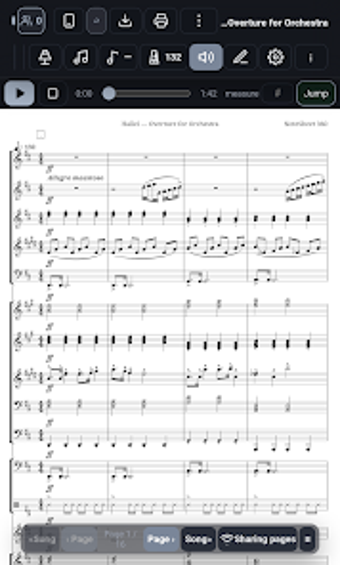
NoteSheet 360: Sheet Music, from developer NoteSheet 360, is a digital sheet-music reader built for conductors and ensembles. It centralizes score delivery so a single device controls synchronized displays across multiple players. The app includes automatic transposition, a photo- and PDF-to-notation conversion tool, and layered annotation. Targeted at orchestras, bands, and choirs, it aims to reduce score-management friction during rehearsals and live performances.

Unlock your creativity with Adobe Stock
Get 10 images or 1 video with a free trial
How printed scores become editable notation for ensembles
NoteSheet 360 turns PDFs and photos into editable notation via a built-in conversion workflow and notation editor. This lets ensembles digitize legacy parts and correct scan errors without leaving the app. Practical outcomes include fixing a misaligned staff on a scanned page, composing short cues inside the editor, and pre-loading the next piece so transitions do not force on-the-fly rescans. A short list of tasks it supports:
- PDF and photo import
- On-device notation edits
- Pre-load next scores
How it behaves during rehearsals and performances
The app operates over a local network so it does not require internet access while on stage. It includes a clean-screen mode and a stay-awake option designed for sustained use on mounted tablets. These choices reduce interruptions from notifications or timeouts and help maintain a steady display during concerts. What's more, pre-loading prevents gaps between pieces, which keeps set transitions tight in live settings.
Who benefits and how the workflow separates roles
Unlike generic score viewers, NoteSheet 360 separates conductor controls from individual player views using layered annotations, so conductor markings are distinct from personal notes. Integrated practice tools such as a synced visual metronome, tuner, and recorder support both group rehearsals and individual practice. Access is organized into an open player tier and an account-gated conductor tier, which maps to typical ensemble hierarchies and rehearsal roles.
In conclusion, a focused tablet solution for mounted-score workflows
NoteSheet 360 is a focused option for ensembles that rely on Android tablets mounted on music stands, since the layout is specifically optimized for that setup. It suits groups that prioritize device-mounted readability and centralized session control, while anyone using non-Android hardware should confirm compatibility before integrating it into established rehearsal and performance routines.